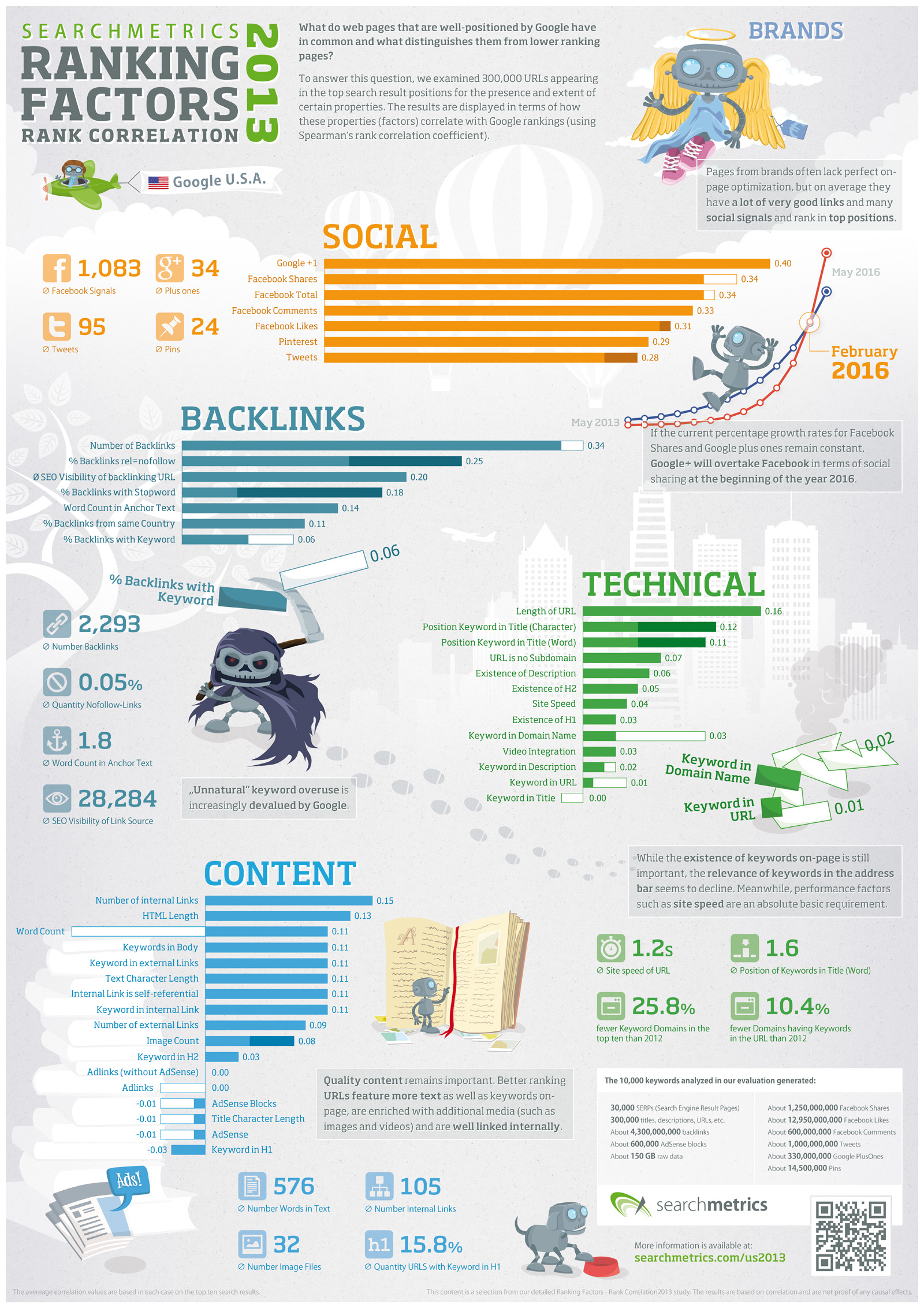
What is Domain Authority?
Domain authority refers to measurement of the strength of a domain and its current and future performance in search engine ranking.
There are three major factors that important to determine the domain authority of any website.

25 Technical Steps to Improve Your Website Domain Authority.
Domain
1- Domain Age (More age, More Authority)
2- Domain History (if the domain used for spamming in the past then the domain will have less authority)
3- Back links (High quality, genuine, relevant and do follow links)
4- Page Rank (High is the best)
Web Content
5- Write Original Content
Web Visitors Behavior
You can affect user behavior through site structure, easy navigation, user friendly and add features that distinct from your competitors.
10- Bounce Rate (Lower is the best)
Server Importance
15- Speed (fast servers improves user experiences that help to increase domain authority)
16- Crawl ability (Frequently crawler errors are really bad and effect domain authority)
17- 100% Uptime (Server which always serving increases traffic as well as domain authority)
18- Malware (if malware found on server domain authority will decrease dramatically)
19- Redirection (Try to avoid unnecessary re-directions of your site)
Crawler errors and malware can be found through Google Webmaster Tool. To check and improve site speed Google Insights will be helpful.
Socialize Your Site
20- +1’s from Google Plus
Domain authority refers to measurement of the strength of a domain and its current and future performance in search engine ranking.
There are three major factors that important to determine the domain authority of any website.
- Domain Age
- Domain Size
- Domain Popularity
Domain age is an indicator of trust to search engines that website owner has maintained registration of a website consistently and interested to increase in traffic to that domain for a long period of time. Domain popularity is measured through the number of inbound links from quality sites that a domain has. The size of a website on a domain contributes towards its authority because the numbers of pages that exist on a domain correlate with the amount of content that can generate inbound links. Domain trust is an important factor because it will help new pages of content (including blog posts) get indexed more quickly and have a better chance of ranking prominently in the search results.
Click here to read more about domain authority.
Click here to read more about domain authority.

25 Technical Steps to Improve Your Website Domain Authority.
Domain
1- Domain Age (More age, More Authority)
2- Domain History (if the domain used for spamming in the past then the domain will have less authority)
3- Back links (High quality, genuine, relevant and do follow links)
4- Page Rank (High is the best)
Web Content
5- Write Original Content
- Users love original contents , so they visit again
6- Write Quality and Useful Content
- Quality content is easily understandable, content should be useful contribution on web
7- Content Adding Frequently (Regularly updating blog/website will have more domain authority)
8- Internal Linking (Each article should be link to other relevant articles on same topic which gives more readership and domain authority)
9- Avoid Strictly Adult/Offence Content
8- Internal Linking (Each article should be link to other relevant articles on same topic which gives more readership and domain authority)
9- Avoid Strictly Adult/Offence Content
Web Visitors Behavior
You can affect user behavior through site structure, easy navigation, user friendly and add features that distinct from your competitors.
10- Bounce Rate (Lower is the best)
- Bounce rate will be low if visitors are interested in your site and stay longer there
11- Returning Visitors (More is the best)
- If the returning visitors increase then, you are successful
12- No. of the Pages View (More is the best)
13- Traffic Sources (More is the best)
14- Time Spent (More is the best)
How users found your site, how many pages they visits and how much time they spend on your site are considered while deciding domain authority.
13- Traffic Sources (More is the best)
14- Time Spent (More is the best)
How users found your site, how many pages they visits and how much time they spend on your site are considered while deciding domain authority.
Server Importance
15- Speed (fast servers improves user experiences that help to increase domain authority)
16- Crawl ability (Frequently crawler errors are really bad and effect domain authority)
17- 100% Uptime (Server which always serving increases traffic as well as domain authority)
18- Malware (if malware found on server domain authority will decrease dramatically)
19- Redirection (Try to avoid unnecessary re-directions of your site)
Crawler errors and malware can be found through Google Webmaster Tool. To check and improve site speed Google Insights will be helpful.
Socialize Your Site
20- +1’s from Google Plus
- +1’s works like back links, more is the best but avoid auto/paid
- Google appreciate +1’s Links
21- Authorship (Increases not only domain authority but also traffic)
22- Social Media Traffic
22- Social Media Traffic
- Traffic from social media like facebook, twitter, google plus etc. shows the popularity and trust among users
Misc. Factors
23- Robots.txt (Which one that allows all search engine to crawl your site)
24- Sitemap.xml (Well-structured sitemap improves domain authority)
25- Develop your website as a valuable asset for web world
Free Tools to Measure Website Domain Authority
23- Robots.txt (Which one that allows all search engine to crawl your site)
24- Sitemap.xml (Well-structured sitemap improves domain authority)
25- Develop your website as a valuable asset for web world
Free Tools to Measure Website Domain Authority